
The Workspace presented by WilsonWorks
A free setup for running your work with Claude Code. One folder for everything, an office where every Claude chat shows up as an AI worker at a desk, and agents with offices of their own. It runs on your own computers, and you can change any of it.
How the office works
The office is a page on your own computer. Open a Claude Code chat on your Hub folder, in VS Code or the Claude desktop app, and it shows up there. The pictures are from a demo install with invented data.
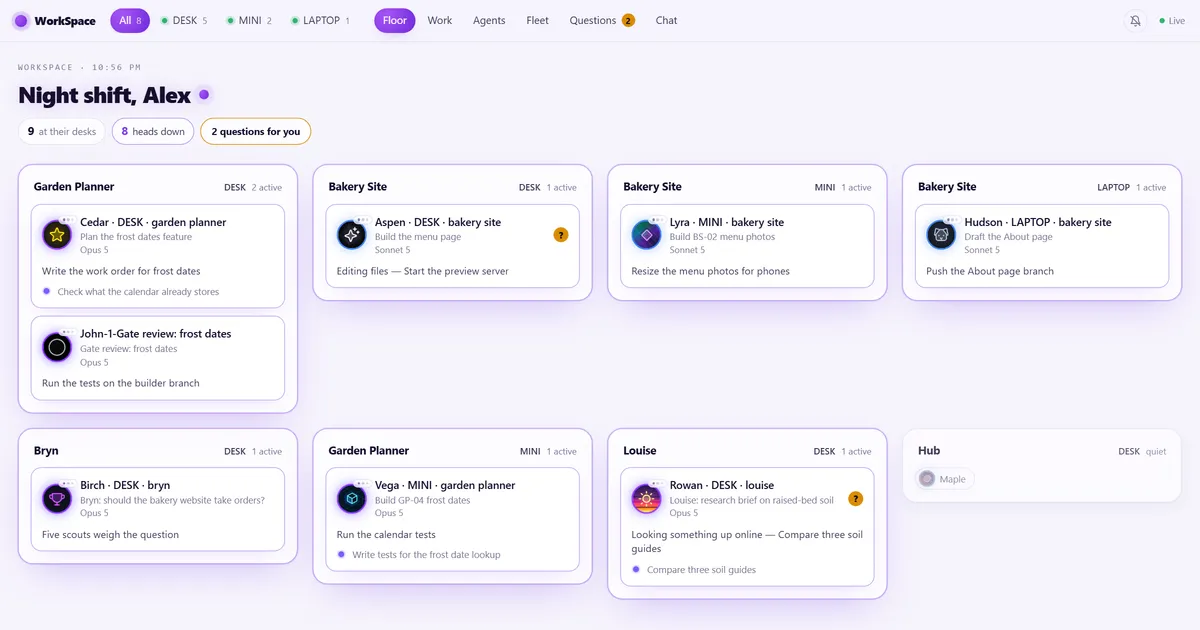
The floor
A room for each project, and an AI worker at a desk for each Claude session in it. Each desk says what that session is doing right now. When a session sends helpers off to do part of the job, you see them under its desk until they come back.
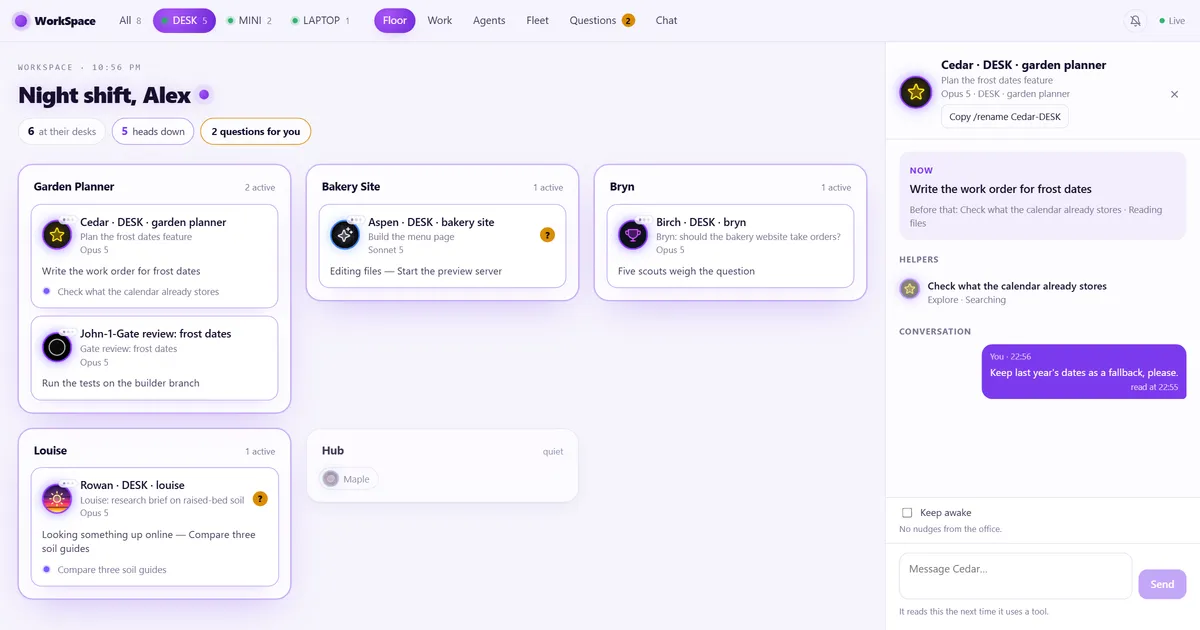
Click an AI Worker
See what that session is doing now, what it did just before, and the helpers working for it. Send it a note. It reads the note the next time it uses a tool, and if it has gone quiet, the note wakes it.
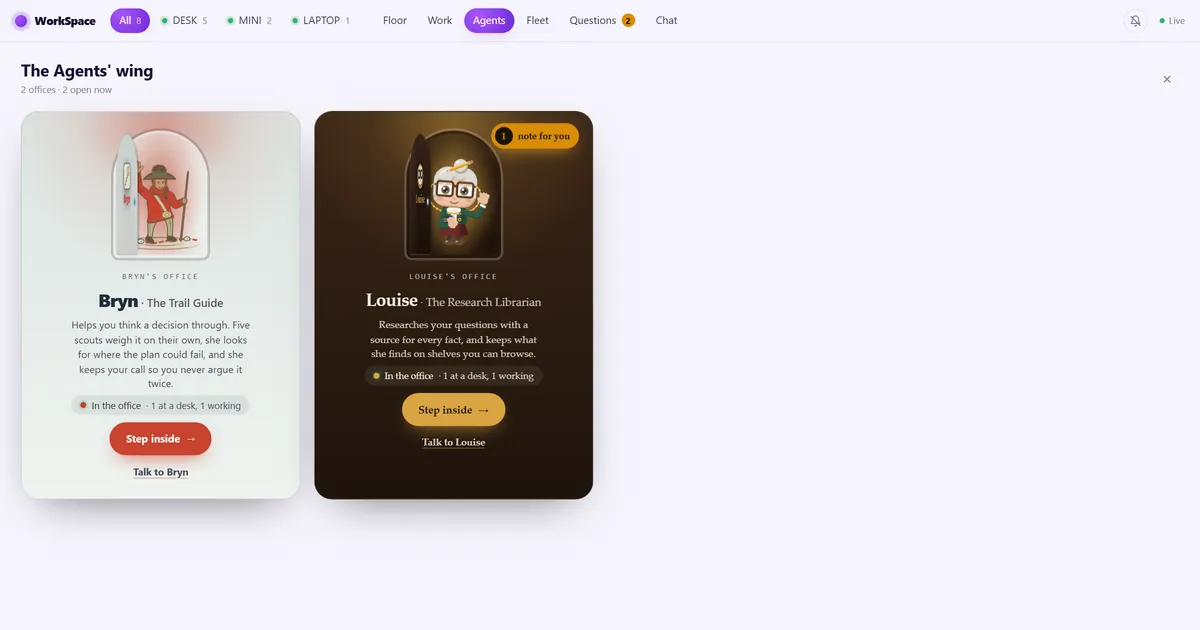
The Agents' wing
Each agent gets an office with its name on the door. The door stands open while it works and shows zzz while it rests. Step inside to open the agent's own page, or knock and it answers with a joke. Make or install an agent, and its office appears by itself.
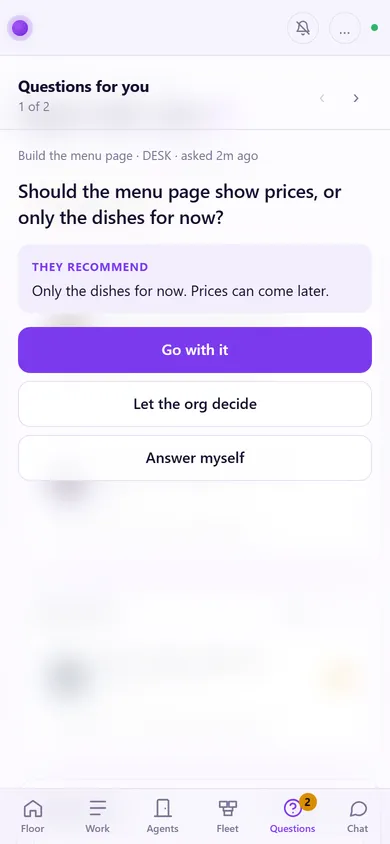
Questions on your phone
When a session needs you, it asks in plain English and says what it would do. Your phone buzzes. Go with it, let the team of agents decide, or answer in your own words. Your phone reaches the office over your own private Tailscale network.
What else comes with it
Your Hub
One folder on each computer for all your work, in numbered zones from
00-Inboxto90-Archive. A short rule book every session reads, and a plain-English map rebuilt from what is on disk, so Claude always knows where things go.The starter skills
Twelve skills from our free Claude skills pack, such as
handoff,notetaker,file-organizer,backlogandscope-check. They're pinned to one version, so they never change under you.A course and a software team
Eleven lessons on the Work page, from your first note to your first agent of your own, each with the prompts to paste. And the Dev Team pack, free: the CTO org, 18 agents set up like a small software company, from James the CTO and John the chief engineer to the builders.
Your computers together (optional)
A private repo of your own that lets the sessions on all your computers work as one team: a board of work orders, a notes file for each computer, and handoffs from a session on one to a session on another.
Private by design
The office reads what a session is doing, never your prompts, messages or files. It listens on your own computer only. Your settings, your logo and your own projects stay on your computer.
Make it yours
Everything here is yours to change, for however you want to use Claude. The quickest way is to ask Claude in a chat on your Hub. The Workspace comes with a prompt for each change.
Its look
Your office's name, its mood, two colours, your logo and the names your sessions go by. The setup chat asks about each one, and you can change them any time.
A new agent
new-agentmakes an agent for one job you do over and over: a folder with its rules, what it knows, its memory and a small page of its own. Its office appears in the Agents' wing at once.The agent contract
Each agent has an
agent.jsonthat says who it is, its colours, its door and how it starts. The Workspace checks it, so what the guide allows and what the code accepts never drift apart.Rules, brains and memory
Rules are what it owns and what it must never do, one checkable rule per file. Brains are what it knows, one file per topic, each fact with where it came from. Memory is what it has learned working with you.
Skills
Add your own beside the starter skills. An agent can name the skills it needs, and installing it adds any you don't have yet.
Agents from the catalog
Install ours by name, like
install-agent louiseorinstall-agent bryn. Each one shows you its plan first.Updates that keep your changes
New features arrive as one line to paste. Claude merges them into your own copy, so what you changed stays changed.
Install it
It's free and public. Plan on an hour, or stop after any step and carry on another day.
- You need Claude Code (the VS Code extension, or the Code tab of the Claude desktop app), Node.js 20 or newer, and Git.
- Make a folder called Hub in your user folder, and open it in Claude Code.
- Start a chat and paste this line:
Set up The Workspace from https://github.com/wilson-works/workspace, following SETUP.md. - Claude asks how you want your office to look and feel, installs it, introduces you to Louise and Bryn, and helps you build your first agent of your own. It shows you every step before it does it.
Rather use a terminal? The one-line installers for Windows and macOS are in the Workspace README (opens GitHub).
Want it set up for you?
We set the Workspace up on your computers with you and make it yours: your look, your agents, your rules. Or I teach your team to do it themselves in a workshop.